PHISHING INDEX
Below are the most common email phishing attempts detected by the TG Soft Anti-Malware Research Center in
May 2026:
31/05/2026 =>
Klarna
29/05/2026 =>
Aruba
26/05/2026 =>
Email Account
19/05/2026 =>
Human Resources
16/05/2026 =>
BPER Bank
15/05/2026 =>
Revenue Agency
14/05/2026 =>
Bank
07/05/2026 =>
Aruba
These emails aim to deceive unsuspecting victims into providing sensitive information, such as bank account details, credit card codes, or personal login credentials, with all the easily imaginable consequences.
31 May 2026 ==> Phishing Klarna
SUBJECT: <
The refund has been confirmed.>
This month, we analyze a new phishing attempt, that masquerades as a communication from Klarna, the Swedish payment service.
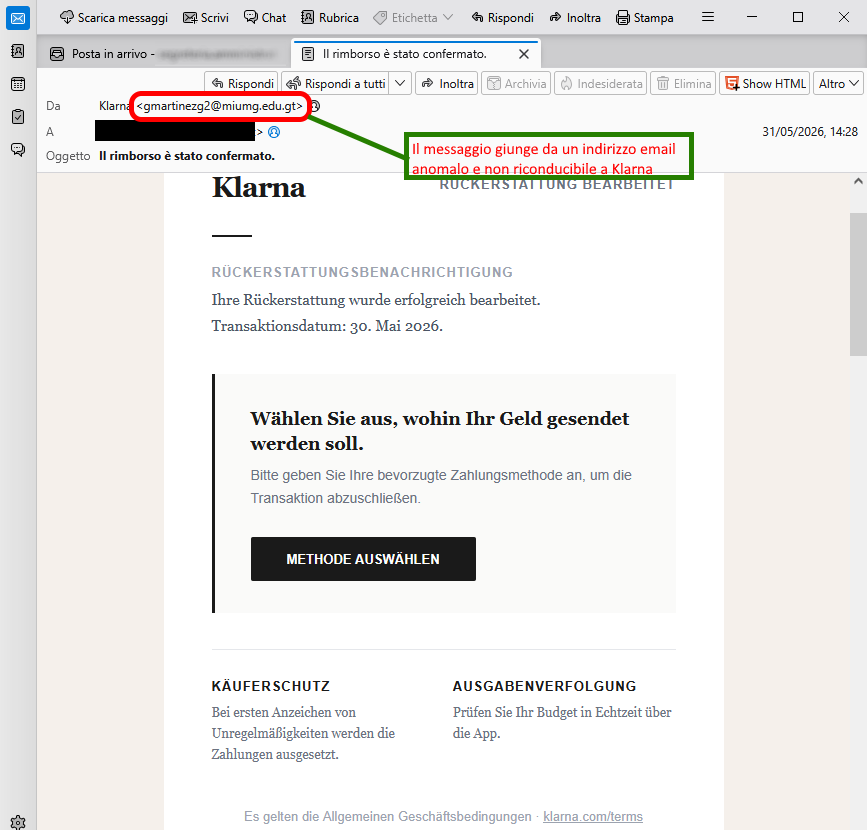
The message, in German, informs the recipient of a REFUND NOTIFICATION. It states, “The refund has been processed successfully. Transaction date: May 30, 2026.” It then invites the recipient to choose how to receive the money by selecting their preferred payment method to complete the transaction, via the “SELECT METHOD” button:
SELECT METHOD
The well-known online payment company,
Klarna, is clearly not involved in the mass sending of these emails, which are outright scams whose aim, as always, is to steal sensitive data from the unsuspecting recipient.
On closer inspection of the message, there are a few clues that raise suspicions. We immediately notice that the email address of the message <
gmartinezg2[at]miumg[dot]edo[[dot]gt> does not belong the official
Klarna domain, a highly unusual fact that should set alarm bells ringing.
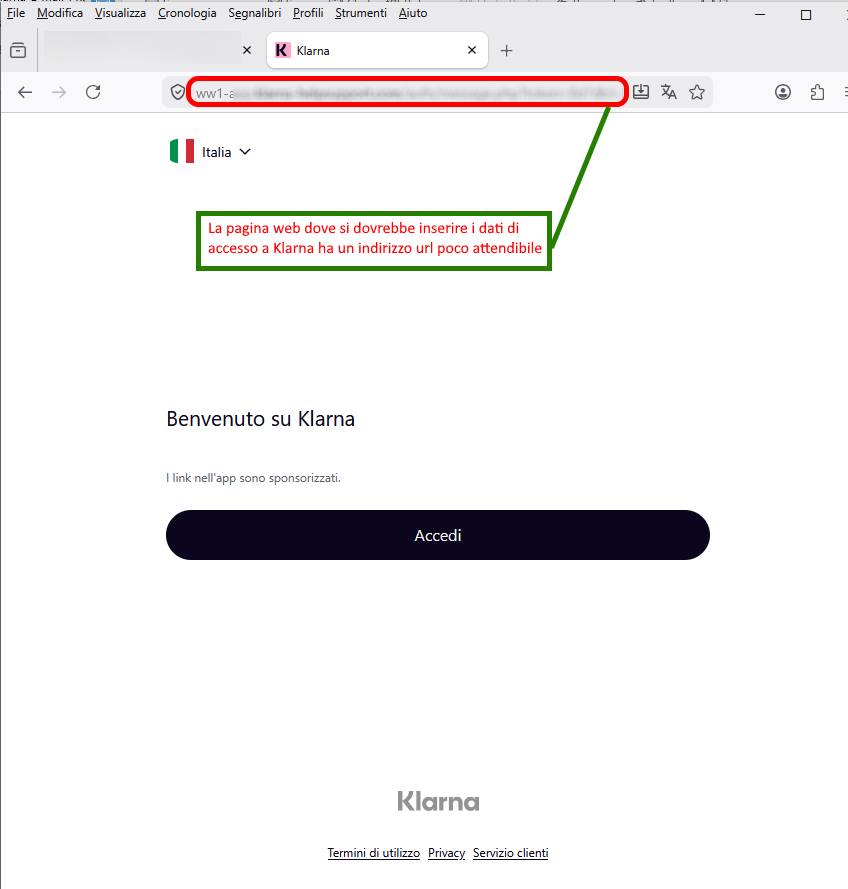
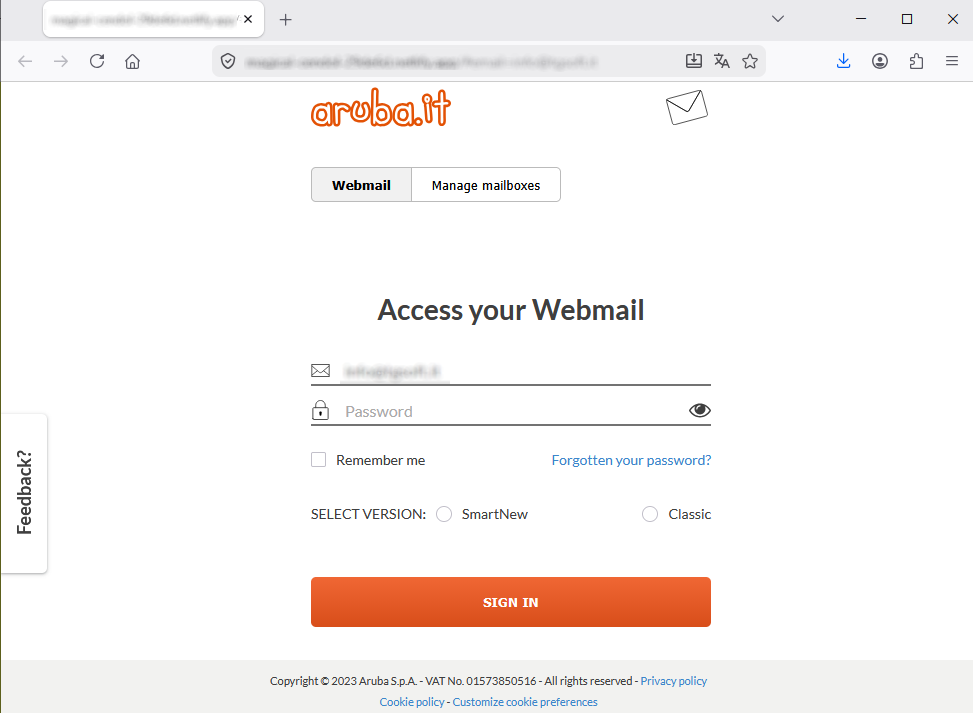
Anyone who unfortunately clicks on the ‘SELECT METHOD’ link will be redirected to a web page which, although it looks like the Klarna account login page, has an unusual address/domain:
https[:]//[FakeDomainName*]
On this page, users are asked to log in to their customer area using their email login and password to retrieve their messages before they are deleted.
We urge you to always pay close attention to every detail, however minor, to take your time, and not to enter your personal details and/or passwords into forms hosted on fake websites, as these will be sent to the cybercriminals behind the scam, who will use them for illegal purposes.
29 May 2026 ==> Phishing Aruba - Invalid access
SUBJECT: <
Delivery errors: [Action required] Friday 29 May 2026>
Phishing attempts posing as communications from the
Aruba brand are continuing this month.
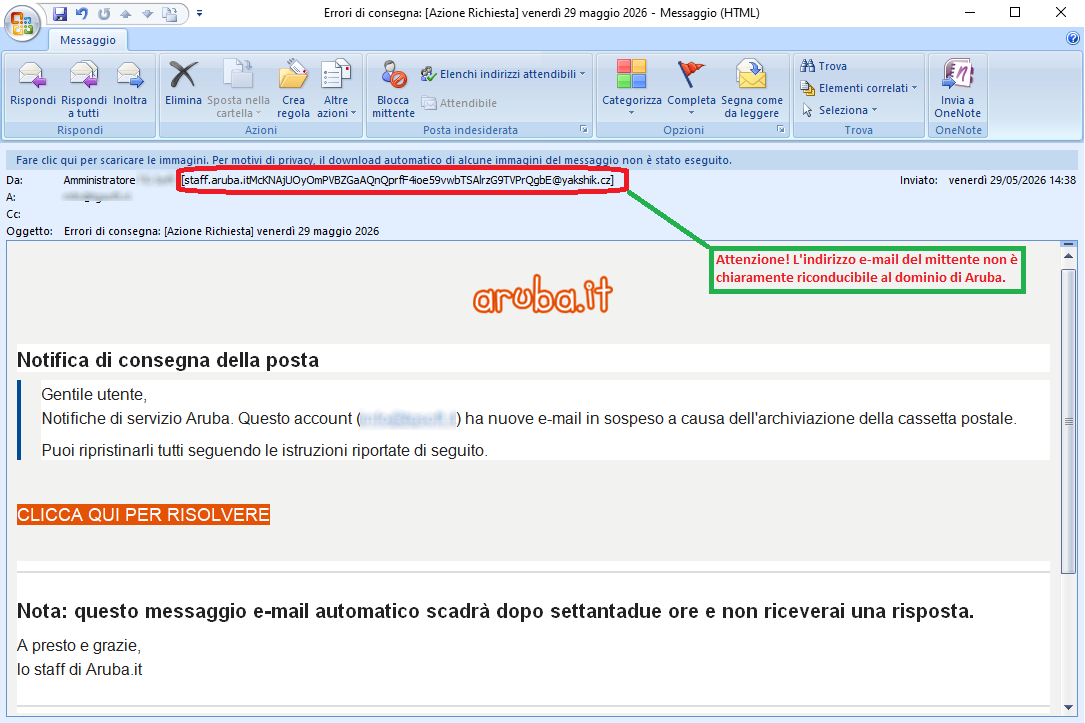
The message informs the recipient that their account ‘
has new emails pending due to mailbox archiving’. It then asks them to check their notifications and restore the pending emails by following the instructions available at the following link:
CLICK HERE TO RESOLVE
We should always be cautious of requests to enter personal credentials through suspicious links sent via email.
The well-known web hosting, email and domain registration company,
Aruba, is clearly not involved in the mass sending of these emails, which are outright scams whose aim, as always, is to steal sensitive data from unsuspecting recipients.
We immediately see that the email address of the message <
staff[dot]aruba[dot]itMcKNAjUOyOmPVBZGaAQnQprfF4ioe59vwbTSAlrzG9TVPrQgbE[at]yakshik[dot]cz>, cannot be traced back to the official
Aruba domain. This is highly unusual and should certainly raise our suspicions.
Anyone who unfortunately clicks on the
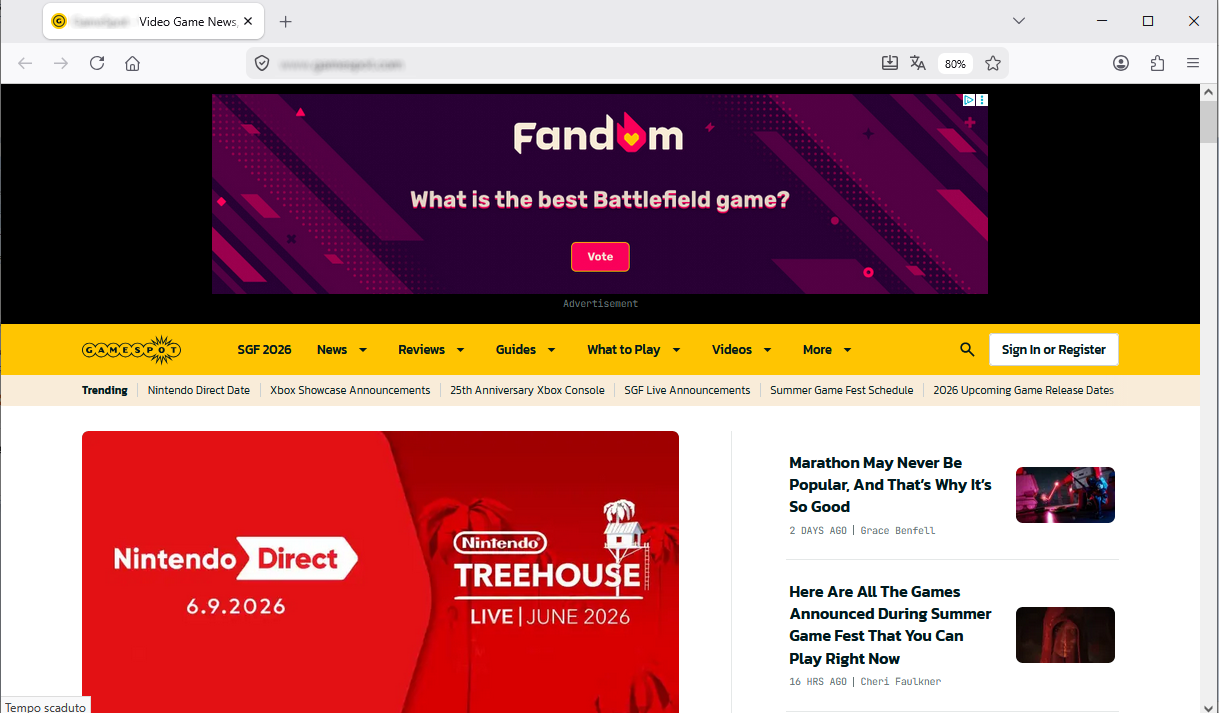
CLICK HERE TO RESOLVE link, will be redirected to a web page that is completely unrelated to the
Aruba account login page, but appears to lead to a gaming site:
https[:]//[FakeDomainName*]
We invite you, to always exercise the utmost caution and to access the site only via the official pages, not via suspicious links.
26 May 2026 ==> Phishing Email Account
SUBJECT: <
Immediate update available>
Below, we analyse the phishing attempt aimed at stealing the victim’s email account credentials.
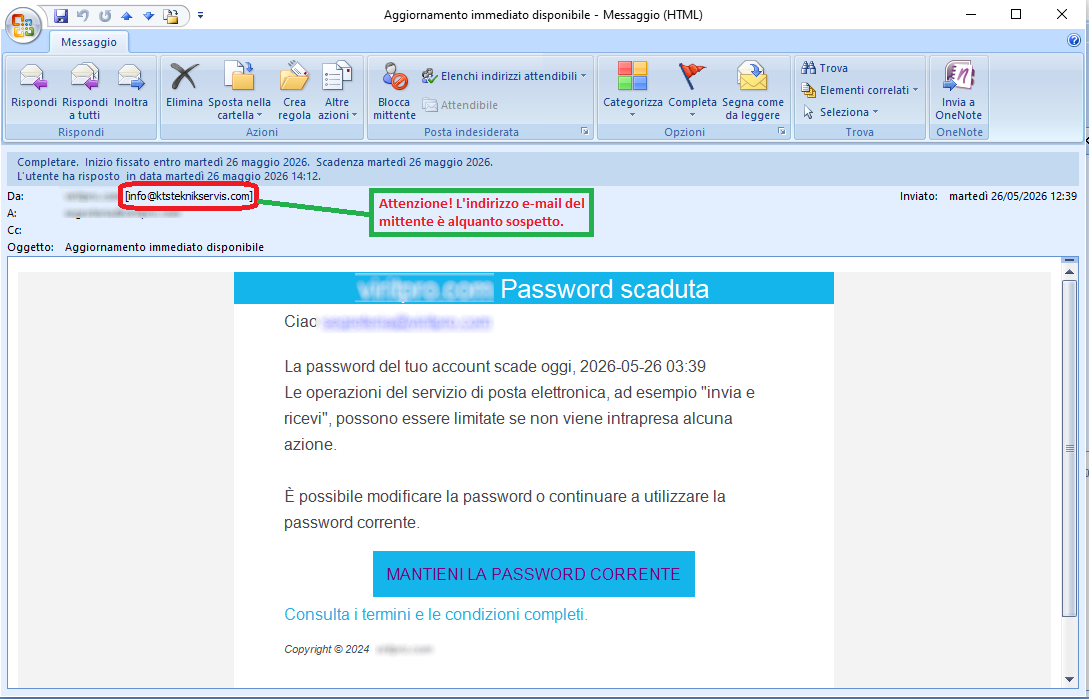
The message informs the recipient that their email account password expired on 26 May, and that they must update it as soon as possible in order to continue using the services linked to their email account. To continue using the password, they can click on the following link:
KEEP YOUR CURRENT PASSWORD
On closer inspection, we can see that the message contains an email address <
info(at)ktsteknikservis(dot)com> that appears to come from the recipient’s email domain. This is highly unusual and should certainly raise our suspicions.
Anyone who unfortunately clicks on the
KEEP YOUR CURRENT PASSWORD link, will be redirected to a fraudulent webpage, which is designed to look like the email account login page but has already been reported as a phishing site. It is in fact run by cybercriminals whose aim is to gain access to your most valuable data so they can use it for their own purposes.
We urge you to always pay close attention to every detail, however minor, and not to enter your personal details and/or passwords into forms hosted on fake websites, as these will be sent to a remote server and used by cybercriminals, with all the associated risks that one can easily imagine.
19 May 2026 ==> Phishing Human Resources
SUBJECT: <
[RecipientDomain]HR Policy and Implementation Procedures>
Below, we examine a phishing attempt seemingly originating from the
Human Resources department, which contains a suspicious attachment..
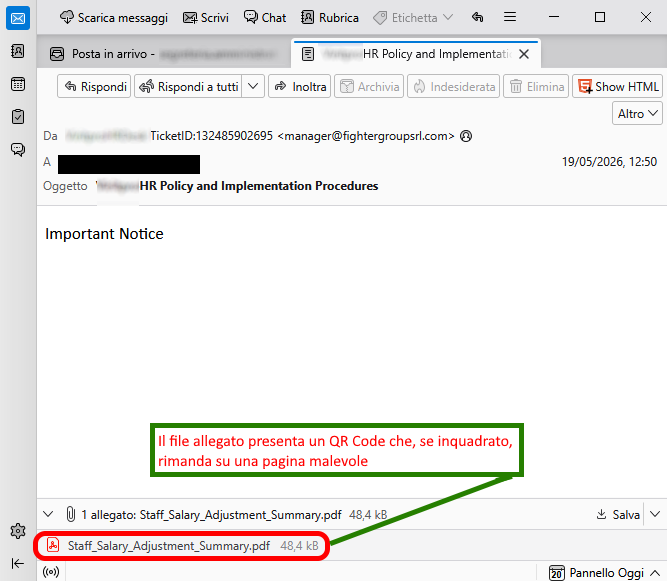
The message is very brief and only refers to an important notice contained in the attached file,
Staff_Salary_Adjustments_Summary.pdf, which relates to staff salary adjustments. To view the details, the user must open the PDF file and scan the
QR code contained within it.
The email immediately looks suspicious. In fact, it isn’t addressed to any specific employee, but simply contains the words ‘
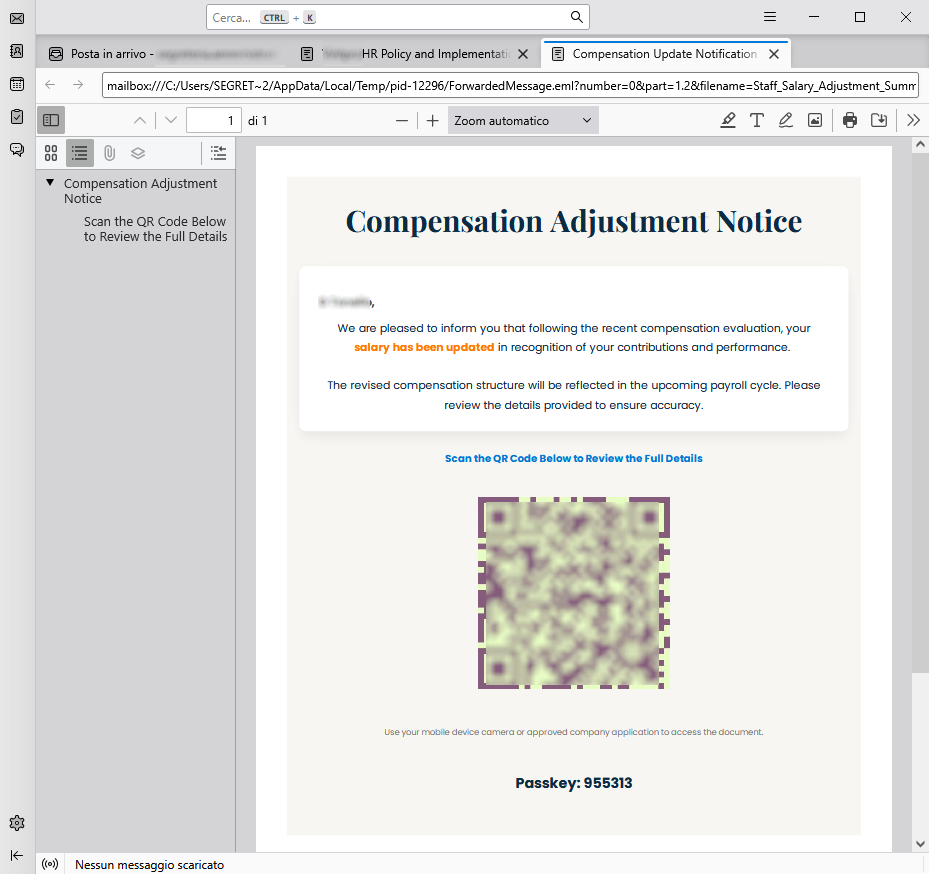
Important Notice’. The focus therefore shifts to the attached file which, as shown in the image below, certainly looks more trustworthy.
Actually, the attached document does not contain any specific details regarding the salary adjustment for the recipient.
We observe that it appears to be effectively addressed to the recipient, whose first and last name are included (presumably retrieved from the email address), but it does not contain any useful information.It therefore seems necessary to use the
QR code, provided to view the details.
The code, of course, redirects the victim to a page where they are asked to enter what are supposedly company login details. This is, in fact, the cybercriminals’ aim.
Therefore, always pay close attention and only access the site via official, recognised pages, not via suspicious links.
16 May 2026 ==> Phishing BPER Bank
SUBJECT: <
Update your details to continue using the service>
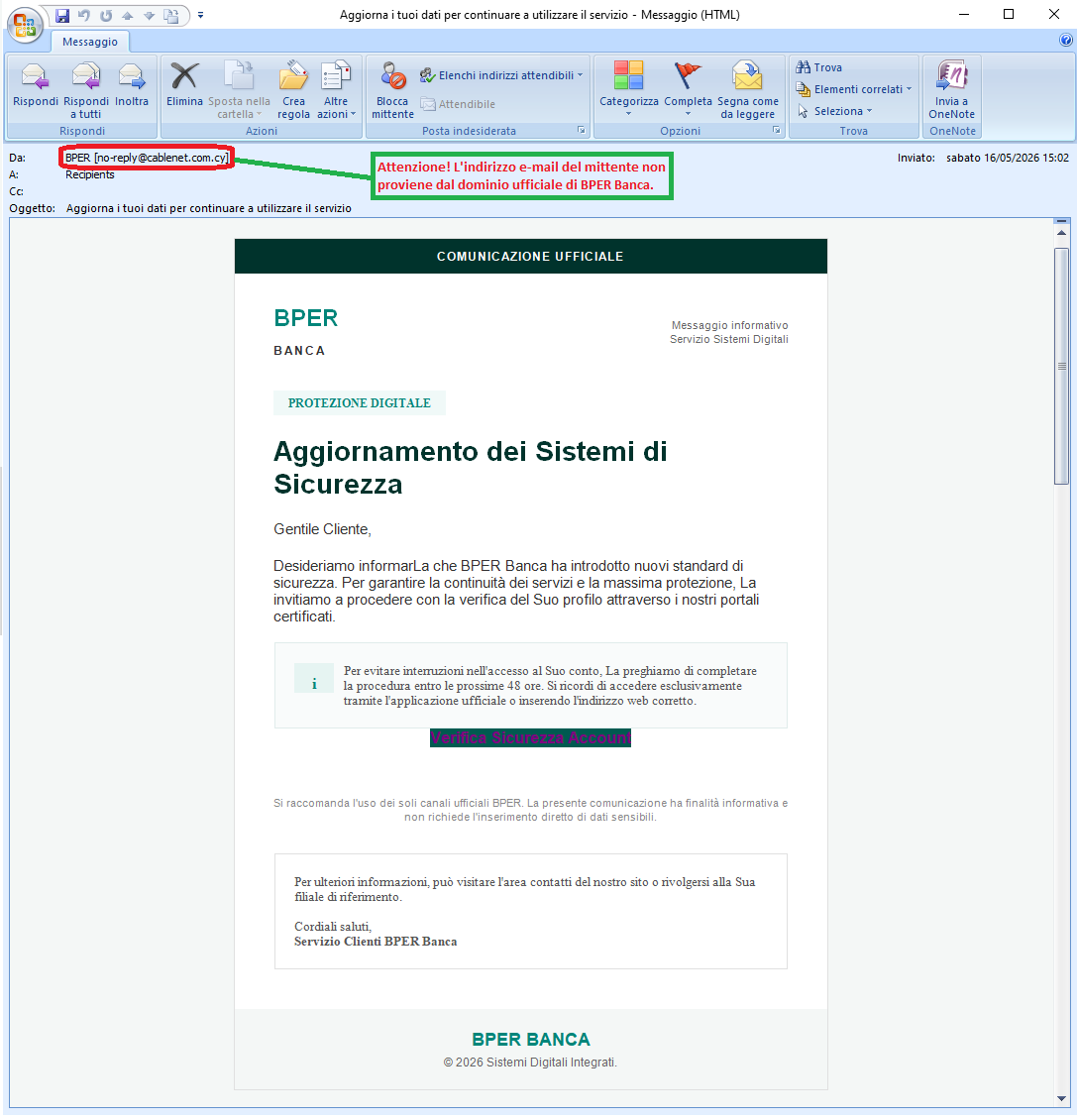
Below, we take a closer look at a phishing campaign carried out via email. By using graphics copied from, or made to resemble, those of a well-known national bank—
BPER Bank in this case—the scammers try to make the message appear official and trustworthy, encouraging unsuspecting recipients to follow the instructions and fall into a social engineering trap.
The message reads: ‘BPER Bank has introduced new security standards. To ensure the continuity of our services and maximum protection, we invite you to verify your profile via our certified portals.’ Users are therefore invited to update their details by clicking on the following link:
Account Security Verification
We can see straight away that the email has a highly suspicious address <no-reply(at)cablenet(dot)com(dot)cy> and contains very generic text, even though it features the well-known BPER Bank logo, which could mislead the user.
The aim is to trick the victim into logging into their online banking account.
Anyone who unfortunately clicks on the Account Security Verification link will be taken to a suspicious website unrelated to the official BPER bank domain. The page has already been flagged as a deceptive/scam website, managed by cybercriminals seeking to steal sensitive personal information for malicious purposes..
In conclusion, we strongly advise you to be wary of any email requesting confidential information and to avoid clicking on suspicious links, as they may lead to a counterfeit website that is difficult to distinguish from the original.
15 May 2026 ==> Phishing Revenue Agency
SUBJECT: <
Official Notice – Tax Refund 2025–2026>
Below, we examine a new phishing attempt coming through a fake message purporting to be from the Italian
Revenue Agency.
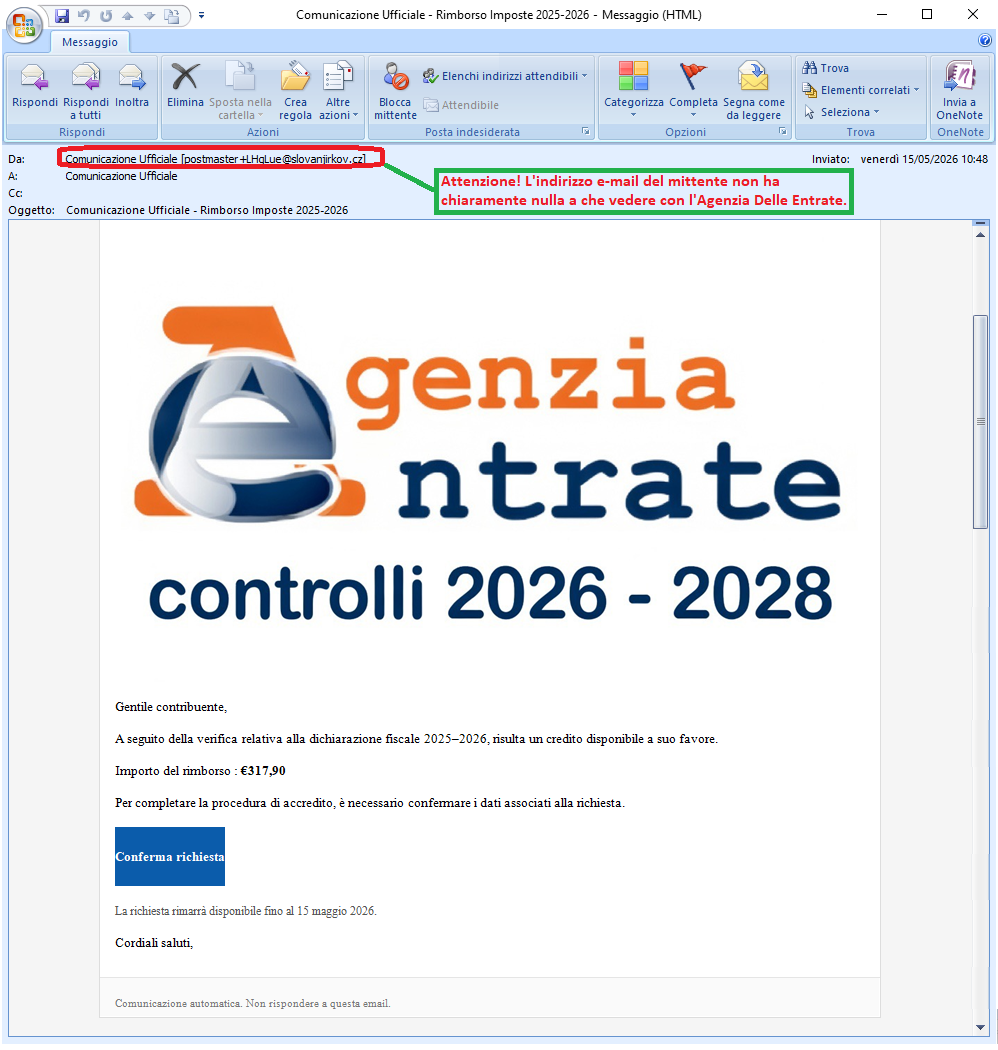
The message informs the recipient that, following the review of the 2025–2026 tax return, a tax credit is available to them. The refund amount is then shown:
If we examine the message, we can see straight away that its email address <postmaster+LHqLue@slovanjirkov[.]cz> is suspicious and is not hosted on the official Revenue Agency domain.
Moreover, the letter is very vague and does not include the taxpayer’s first and last name, as we would expect, nor the file reference number; it simply states the amount of the refund.
It is also unusual that a very short deadline has been set for claiming the refund, namely 15 May 2026.
To access the notification and complete the accreditation process, the following link is provided:
Confirm request
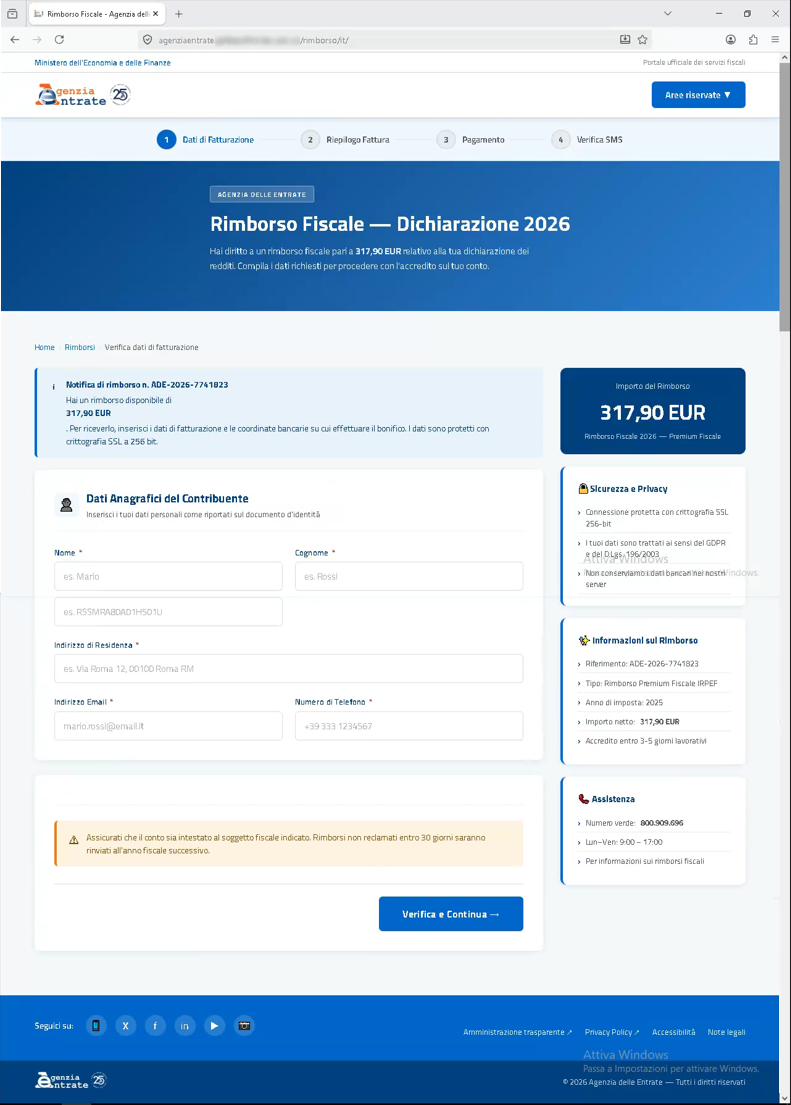
Anyone who unfortunately clicks on the links, will be redirected to a counterfeit web page of the Agency.
As the image below shows, the webpage is well designed and quite effectively imitates the website of the
Revenue Agency.
However, to access the Members’ Area, the users are required to provide their first name and surname, residential address, email address and telephone number. This is rather unusual, as to access the Revenue Agency’s platform, users must possess an identity verified within the Public Digital Identity System (SPID, CIE or CNS) or credentials issued by the Revenue Agency. This should make us even more wary of the request’s credibility.
In addition, the web page’s URL is not related to the official website of the Italian Revenue Agency.
With this in mind, we urge you to pay close attention to any misleading details, always check the URL where the login form is hosted, and assess the legitimacy of the request before entering any sensitive data.
We would like to remind you that the Italian Revenue Agency is in no way involved in the mass distribution of these phishing campaigns, and we urge you, if in any doubt, to check its official website, which frequently warns of scam attempts using its name.
14 May 2026 ==> Phishing Phishing Bank
SUBJECT: <
Reminder: Card restrictions from 17 May 2026>
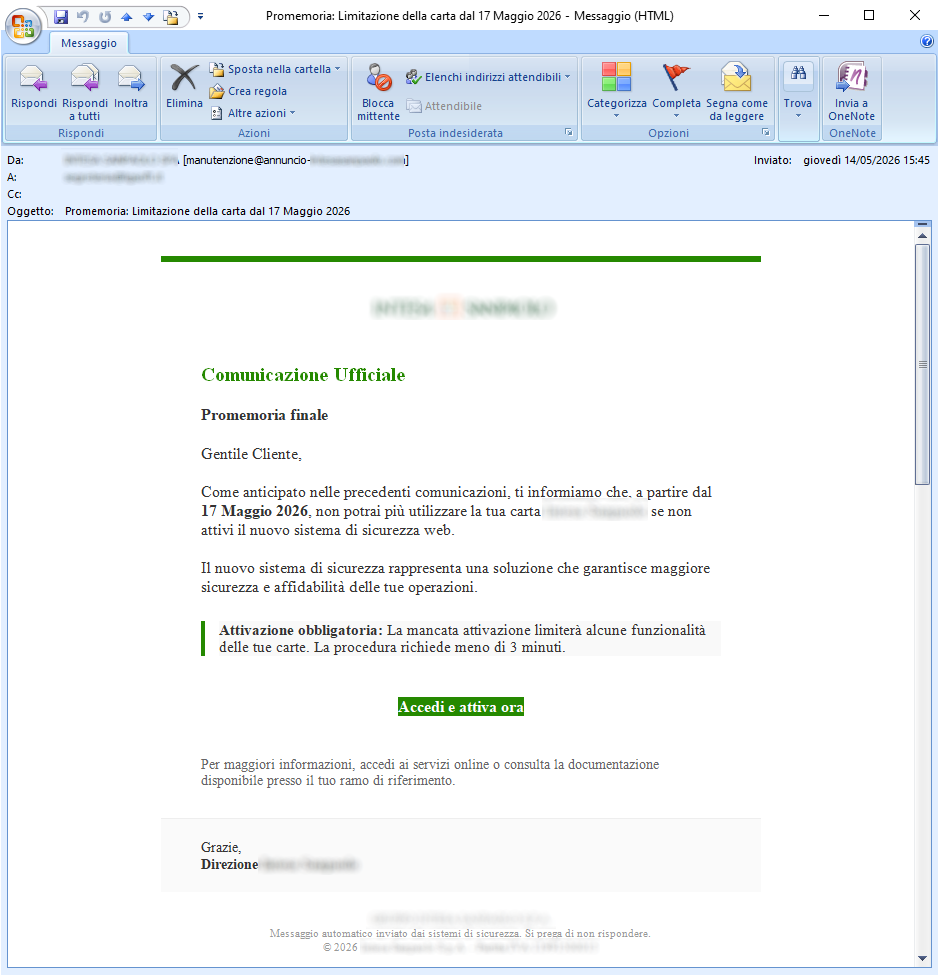
The message, using graphics stolen from or similar to those of a well-known bank, attempts to pass itself off as an official communication, in order to induce the recipient to comply with the request and fall into this trap, based on social engineering techniques.
The message informs the unsuspecting recipient that, for security reasons, they must activate the new online security system by
17 May 2026, otherwise they will no longer be able to use their Intesa Sanpaolo card. Activation is mandatory to avoid any restrictions on the use of the card; the process is quick – the user simply needs to click on the following link:
Log in and activate now
We can immediately see that the message comes from a highly suspicious email address, <
manutenzione(at)annuncio-***(dot)com>, and contains very generic text, despite the inclusion of the bank's logo in an attempt to mislead the user. The aim is to trick the victim into logging into their banking app so that their details can be stolen.
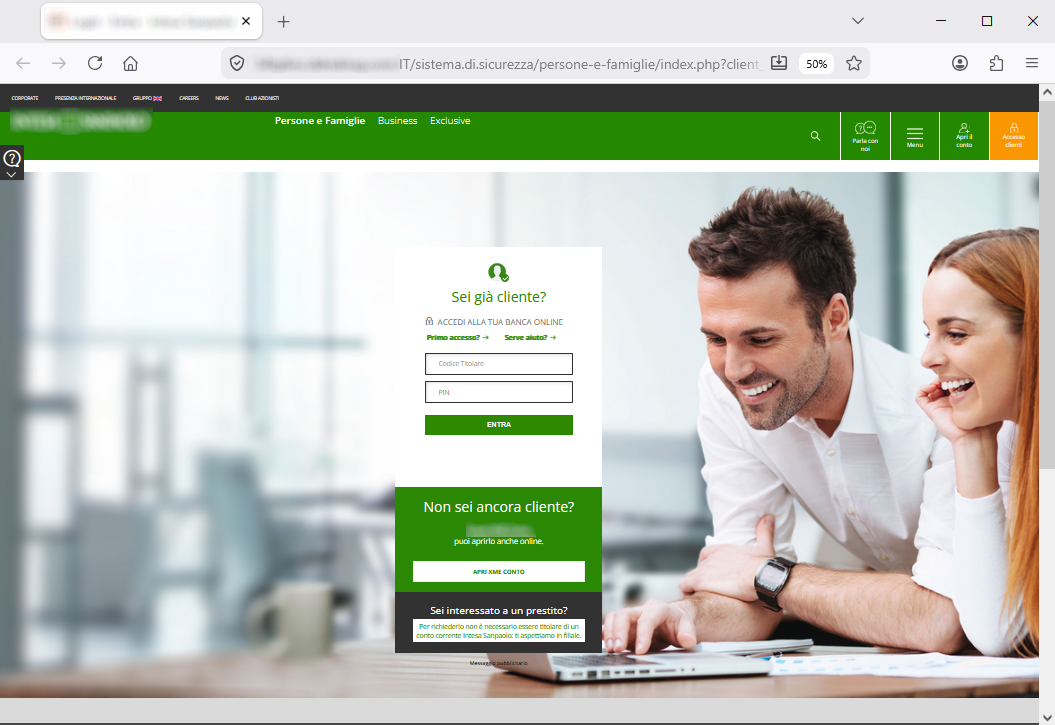
Anyone who unfortunately clicks on the
Log in and activate now link, will be redirected to a fraudulent webpage, unrelated to the official website of the bank.
From the image shown on the side, we can see that the webpage is well designed and simulates the official banking portal website quite well. In fact, we can see several other menus such as ‘
Contact Us’ – ‘
Menu’ – ‘
Open an Account’ – ‘
Customer Login’, which are intended to further reassure users about the authenticity of the portal, although the links provided do not lead to the specified pages.
Based on these considerations, we urge you to pay close attention to every detail, keeping in mind that before entering sensitive data, every detail must be carefully checked.
This FRAUDULENT WEBSITE is run by cybercriminals whose aim is to get hold of your most valuable data so they can use it for their own purposes.
07 May 2026 ==> Phishing Aruba - Invalid access
SUBJECT: <
We have detected an unauthorised login attempt from an unrecognised device.>
Phishing attempts posing as communications from the
Aruba brand are continuing this month.
.
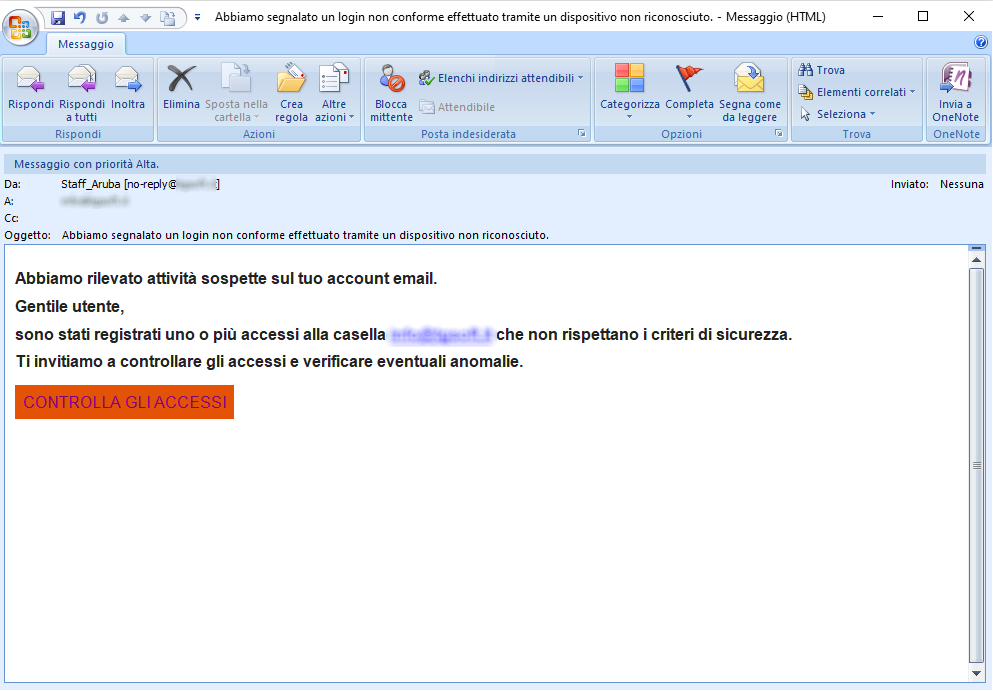
The message tells the recipient: ‘
Suspicious activity has been detected on your email account [...] One or more logins to the ***** account have been recorded that do not meet security criteria.’ It therefore asks them to check their access details and look out for any issues via the following link:
ACCESS CONTROL
Let's always exercise caution when we're asked to enter our personal details via suspicious links sent by email.
The well-known web hosting, email and domain registration company,
Aruba, is clearly not involved in the mass sending of these emails, which are outright scams whose aim, as always, is to steal sensitive data from unsuspecting recipients.
We see straight away that the email address in the message <
no-reply[at]****[dot]it> does not belong to the official
Aruba domain . This is highly unusual and should certainly raise our suspicions.
Anyone who unfortunately clicks on the
ACCESS CONTROL link will be redirected to a web page which, although it visually mimics the
Aruba account login page – featuring the well-known company’s logo – has an unusual address/domain:
https[:]//[FakeDomainName*]
On this page, users are asked to log in to their customer account using their email address and password. The aim of the cybercriminals behind the scam is, in fact, clearly to steal these details.
Therefore, always pay close attention and only access the site via the official pages, not via suspicious links.
A little attention and a quick glance can save you a lot of hassle and headaches...
We urge you NOT to be fooled by these types of e-mails, which, even though they use familiar and not particularly sophisticated approach techniques, if there is a resurgence, with reasonable likelihood more than a few unfortunates will be fooled.
We invite you to check the following information on phishing techniques for more details:
02/04/2026 11:01 - Phishing: the most common credential and/or data theft attempts in April 2026.
04/03/2026 10:44 - Phishing: the most common credential and/or data theft attempts in March 2026.
04/02/2026 10:33 - Phishing: the most common credential and/or data theft attempts in February 2026.
08/01/2026 09:53 - Phishing: the most common credential and/or data theft attempts in January 2026.
04/12/2025 15:56
- Phishing: the most common credential and/or data theft attempts in December 2025.
04/11/2025 14:45
- Phishing: the most common credential and/or data theft attempts in Novembre 2025.
01/10/2025 16:40 - Phishing: the most common credential and/or data theft attempts in October 2025.
04/09/2025 09:45 - Phishing: the most common credential and/or data theft attempts in September 2025.
05/08/2025 08:58- Phishing: the most common credential and/or data theft attempts in August 2025.
01/07/2025 16:04 - Phishing: the most common credential and/or data theft attempts in July 2025.
05/06/2025 09:22 - Phishing: the most common credential and/or data theft attempts in June 2025.
05/05/2025 15:03 - Phishing: the most common credential and/or data theft attempts in May 2025.
Try Vir.IT eXplorer Lite
 If you are not yet using Vir.IT eXplorer PRO, it is advisable to install Vir.IT eXplorer Lite -FREE Edition- to supplement the antivirus in use to increase the security of your computers, PCs and SERVERS.
Vir.IT eXplorer Lite has the following special features:
- freely usable in both private and corporate environments with Engine+Signature updates without time limitation;
- fully interoperable with other AntiVirus software and/or Internet Security products (both free and commercial) already installed on your computer. It doesn't need any uninstallation and it doesn't cause slowdowns, as some features have been appropriately reduced to ensure interoperability with the AntiVirus software already on your PC/Server. This, however, allows cross-checking through the scan;
- it identifies and, in many cases, even removes most of the viruses/malware actually circulating or, alternatively, allows them to be sent to the C.R.A.M. Anti-Malware Research Center for further analysis to update Vir.It eXplorer PRO;
- through Intrusion Detection technology, also made available in the Lite version of Vir.IT eXplorer, the software is able to report any new-generation viruses/malware that have set in automatically and send the reported files to TG Soft's C.R.A.M
- Download Vir.IT eXplorer Lite from the official distribution page of TG Soft's website.
Acknowledgements
TG Soft's Anti-Malware Research Center would like to thank all users, customers, reseller technicians, and all people who have transmitted/reported material attributable to Phishing activities to our Research Center, that allowed us to make this information as complete as possible.
How to submit suspicious emails for analysis as possible phishing but also virus/malware or Crypto-Malware
You can submit materials to TG Soft's Anti-Malware Research Center safely and free of charge in two ways:
- any suspect email can be sent directly by the recipient's e-mail, to the following mail lite@virit.com,choosing as sending mode "Forward as Attachment" and inserting in the subject section "Possible phishing page to verify" rather than "Possible Malware to verify";
- save the e-mail to be sent to TG Soft's C.R.A.M. for analysis as an external file to the e-mail program used. The resulting file must be sent by uploading it from the page Send Suspicious Files (http://www.tgsoft.it/italy/file_sospetti.asp). Obviously if you want a feedback on the analysis of the data submitted, you have to indicate an e-mail address and a brief description of the reason for the submission (for example: possiible / probable phishing; possible / probable malware or other).
For more details on how to safely forward suspicious e-mails, we invite you to consult the following public page:
How to send suspicious emails for analysis
We provide all this information to help you prevent credential theft, viruses/malware or, even worse, next-generation Ransomware / Crypto-Malware.
TG Soft Anti-Malware Research Centre (C.R.A.M.)